Marketing Companion MCP (MKT MCP) is a remote MCP server that lets ChatGPT and Claude query GA4, Search Console, Google Ads, Business Profile, Merchant Center, Tag Manager, BigQuery, Meta and CallRail in plain language, through 125 tools and 125 expert presets, and opens a live marketing dashboard right in the chat.
{
  "rows": [ { "query": "ga4 mcp server", "position": 6.2, "impressions": 2140 }, … ],
  "rowCount": 14,
  "requestCount": 1,
  "notes": ["Positions are averages; they cannot be summed."]
}
I found 14 searches where you rank between positions 5 and 20 with real impressions. The three closest to page one:
Search
Position
Impressions
ga4 mcp server
6.2
2,140
search console api limits
8.9
1,380
google ads search terms report
11.4
3,020
“ga4 mcp server” is the quickest win. The page already ranks, so a sharper title and two internal links should lift it onto page one.
Reply to Claude…Ask anything
marketing-data-mcp
Try:
Illustration with sample data. Claude and ChatGPT interfaces recreated to show the connector in use.
Connects the marketing platforms you already use
Google Analytics 4
Search Console
Google Ads
Merchant Center
Business Profile
Tag Manager
BigQuery
Meta
CallRail
01 Platforms
Nine platforms. One protocol.
One connector puts nine marketing APIs behind the same conversation. Pick a platform to see what it covers, what it is good at, and the limits the server states out loud.
125 tools · one server
Google Analytics 4
17 tools · 24 presets
Standard, realtime, pivot, funnel and cohort reports, batches, and one report across up to 10 properties. The Admin API adds key events, custom definitions, data streams, audiences, product links and change history.
Good at
Channels, landing pages, ecommerce and event-driven key events.
Says out loud
Thresholding and sampling can suppress small segments.
Google Search Console
8 tools · 14 presets
Queries, pages, countries, devices and search appearance; striking-distance opportunities; Discover and Google News; period-over-period deltas; sitemaps and URL Inspection, across up to 10 sites.
Good at
Authoritative organic query and page performance.
Says out loud
25,000 rows per request, and anonymised queries sum below the site total.
Google Ads
10 tools · 34 presets
Campaigns down to search terms and assets, Shopping and Performance Max, impression share and Quality Score, Keyword Planner and Reach Planner, and one GAQL query across every client of a manager account.
Good at
Paid performance, search terms and conversion reporting.
Says out loud
Auction Insights is not in the API. One call is one request, never a silent quota drain.
Google Merchant Center
14 tools · 13 presets
Product status and item issues, free listing and Shopping performance by product, brand, category and country, price competitiveness and insights, best sellers and competitive visibility.
Good at
Feed health and product-level visibility, with or without Google Ads.
Says out loud
The Cloud project must be registered once per account; that is the only write tool.
Meta
10 tools · 22 presets
Meta Ads insights with age, gender, country, platform, device and placement breakdowns; Facebook Page and Instagram organic insights; creatives, pixels and audiences; and competitor ads from the Ad Library. Connected as an optional second sign-in.
Good at
Delivery, spend and organic reach across Facebook and Instagram.
Says out loud
Meta's attribution windows differ, so compare trends with GA4, not totals.
CallRail
9 tools · 18 presets
Calls by source, campaign, keyword, landing page and tracker; answered versus missed; first-time versus repeat callers; and daily trends, normalized so calls join Google Ads, GA4 and Search Console rows. You connect it with your own CallRail API key during sign-in; the key is sealed inside your encrypted token, and without one everything else works as usual.
Good at
Phone-call attribution that joins the rest of the funnel.
Says out loud
Presets aggregate one page of calls; check fetched against total.
Google Business Profile
45 tools · local SEO
Every location you manage: details and attributes, reviews with a backlog of the unanswered ones, review replies, posts and their insights, photos and media, daily performance and the monthly search keywords people used to find you. Reading is the default; the 13 tools that change a listing run only when you ask, and your assistant confirms first.
Good at
Local SEO: reviews to answer, posts that work, the searches that find you.
Says out loud
Search keywords are monthly impressions, not clicks or rank; profile views are not GA4 sessions or Ads clicks.
Google Tag Manager
2 tools · read-only
Read any published container you can access, and run a tracking audit scored out of 100: dead Universal Analytics tags, missing or duplicate GA4 IDs, conversions without a Conversion Linker, purchase events without ecommerce data, tags that never fire, broken triggers, risky Custom HTML, duplicates that double-count, tags with no consent settings and unpublished changes.
Good at
Finding why a conversion stopped counting.
Says out loud
It reads the container's setup; it does not watch tags fire on the live site.
BigQuery GA4 export
3 tools · read-only
Find your GA4 export datasets and query the raw event data: event-level detail that the GA4 reporting API thresholds, samples or never shows.
Good at
Exact counts, user paths and anything thresholding hides.
Says out loud
Queries bill your BigQuery project, so it runs a free dry run first, estimates the cost and caps the bytes billed.
02 Dashboard
Your whole funnel, open inside the chat.
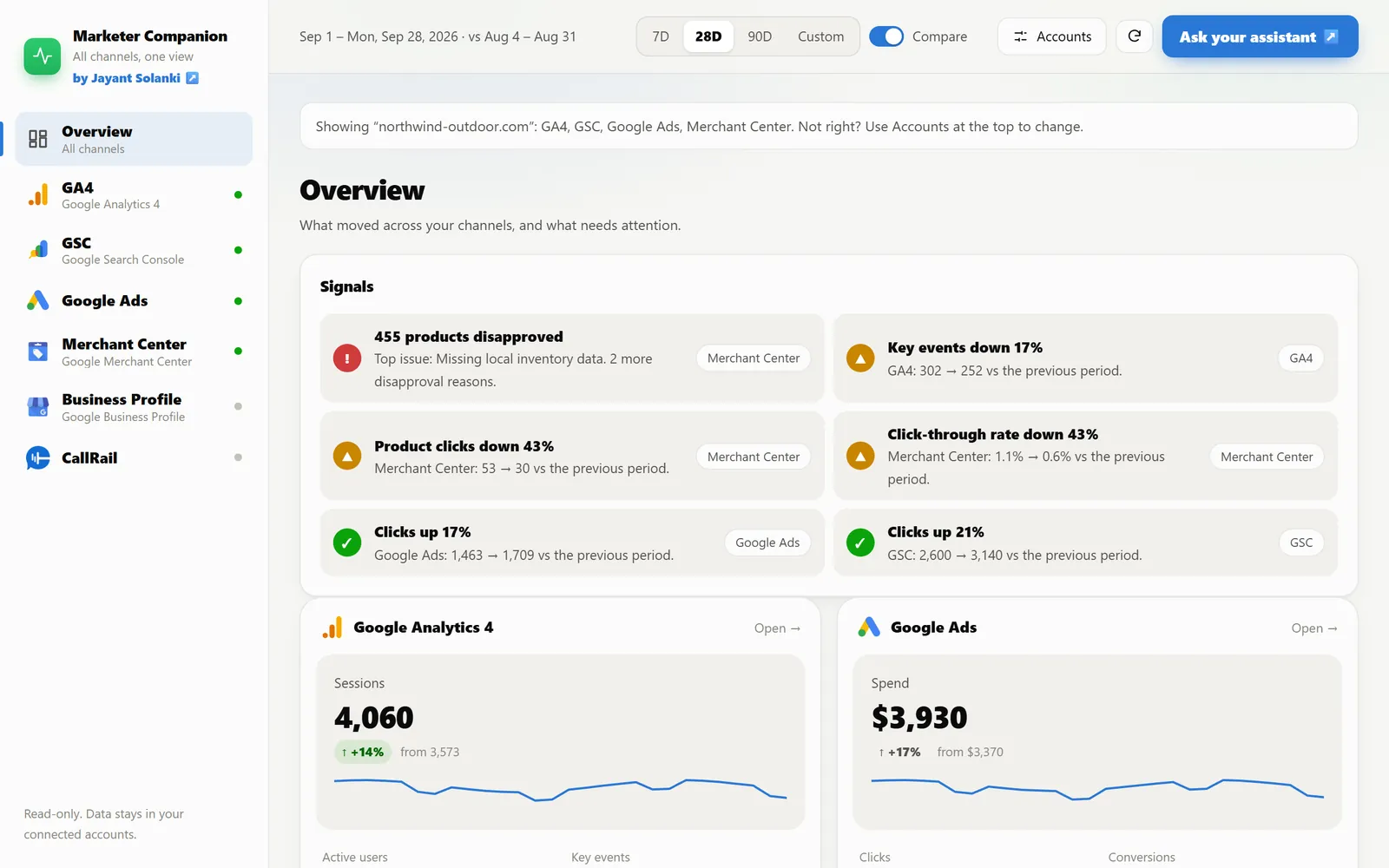
Ask for your marketing dashboard and ChatGPT or Claude opens a live one in the conversation. Name a business or website and it finds that business's accounts in every source by itself.
ChatGPT · Marketing Companion MCP
Open the marketing dashboard for northwindoutdoor.com
What moved, and what needs attentionBiggest movers, product disapprovals, unanswered reviews, missed calls, and spend rising while conversions fall, ranked across every connected source.
Six sources, one viewGA4, Search Console, Google Ads, Merchant Center, Business Profile and CallRail, each with stat tiles, period deltas and a trend against the previous period.
Filters without a second promptChannel, source, campaign, device, country, landing page, query and more, applied on the server, with top 10, 25 or 50 rows and sortable columns.
Ask about what you seeOne button hands the view back to your assistant, so the next question starts from the numbers on screen.
03 Google Business Profile
Run your Business Profile from the chat.
Reviews to answer, posts to publish, photos to tidy, hours and categories to keep straight, and the searches that find you, for every location you manage. 45 tools, so local SEO work happens where you already ask questions.
Northwind Outdoor · 3 locations
Which reviews haven't I replied to yet?
gbp_review_backlog read · all locations
4 reviews are waiting. The oldest is 9 days old, and two of them are below four stars.
PPriya S.★★★★★“Install went fine but nobody called me back about the warranty.”9 days
MMarcus T.★★★★★“Good price, the wait for delivery was longer than quoted.”6 days
KK. Lee★★★★★“Clear quote and a very tidy crew.”2 days
Draft a reply to Priya.
“Hi Priya, thank you for telling us, and we're sorry nobody called back. Your warranty is active; our team will ring you today to walk through it.”
Publish this reply on Google? This changes your profile.EditPublish
gbp_publish_review_reply write · confirmed by you · reply is live
Illustration with sample data. Write actions always wait for your confirmation.
Try asking
“Which reviews haven't I answered, across all locations?”
“Post this weekend's offer to every location.”
“What did people search to find us last month?”
“Did Google change our hours or categories on its own?”
“Which location got the most calls and direction requests?”
“Remove the duplicate photos customers uploaded.”
Reads first. Asks before it writes.
32 of the 45 tools only read. The other 13 change your profile: replies, posts, photos and listing details. They are marked as write actions, so ChatGPT and Claude show you exactly what will change and wait for your yes.
04 Questions
150 questions it already knows how to answer.
You don't need to know report names or metrics. Ask in your own words; behind 125 of these questions is a ready-made expert report, and the rest go straight to the Business Profile, Tag Manager and BigQuery tools. Pick a platform, or search, and click a question to copy it into Claude or ChatGPT.
150questions across nine platforms
Google Analytics 4
Where visitors come from 6
Pages and content 3
Engagement and conversions 5
Online store 5
Who my visitors are 5
Google Search Console
Rankings 4
Who finds me, and how 5
Trends 3
Discover and News 2
Google Ads
Performance 7
Competition and quality 2
Shopping and Performance Max 4
Audience and targeting 7
Conversions and landing pages 3
Account setup 5
Video and calls 2
Audits 4
Google Merchant Center
Product performance 5
Feed health 1
Pricing 2
Market and competitors 5
Meta (Facebook and Instagram)
Facebook and Instagram ads 7
Who sees my ads 6
Facebook Page 4
Instagram 5
CallRail
Calls at a glance 3
What makes the phone ring 7
Who calls 4
Call quality 4
Google Business Profile
Reviews and replies 3
Posts and photos 4
Listing details 3
Local performance 2
Google Tag Manager
Container health check 5
Conversions and consent 2
BigQuery GA4 export
Your export 2
Raw event answers 4
No question matches that. Try “revenue”, “mobile” or “calls”.
The numbersStraight from the platform, never estimated.
The report it ranSo anyone can check exactly what was asked.
Rows that line upGoogle Ads, Meta and GA4 side by side.
Honest notesWhat the data can and can't tell you.
05 Guardrails
It tells you what it can't do.
Every response carries platform guardrails, so the assistant states an API's limits instead of filling the gap with a confident guess.
You ask
Show me Auction Insights for my top campaign.
A guess
competitor-a.com · IS 41% competitor-b.com · IS 33% overlap rate · 27%
This server
Auction Insights isn't exposed by the Google Ads API, so no tool here can return it. Impression share is available instead, through the impression_share preset.
You ask
Add up clicks from all my Search Console queries.
A guess
Σ query clicks = site total 48,210 clicks
This server
Search Console anonymises some queries, so query rows add up to less than the site total. Use the page or site total for that number.
You ask
Why don't Meta conversions match GA4?
A guess
tracking is broken fix your pixel
This server
Meta attributes conversions on its own windows, so the counts won't tie out with GA4 or Google Ads. Compare trends, not totals.
06 Security
Stateless by design.
There is no database. Your connection lives inside an encrypted token that only this server can open, and tools read by default.
Sign in with Google through standard OAuth. You choose the account, and there are no API keys to copy.
Tools read by default. The few that change something, such as a Business Profile reply, wait for your yes.
It accepts only tokens it issued itself, and keeps tokens out of its logs.
One tool call is one API request, so your platform quotas stay predictable.
issuerhttps://ga4mcpjs.vercel.app
resourcehttps://ga4mcpjs.vercel.app/mcp
scopeanalytics.readonly · webmasters.readonly · …
expiryshort-lived · refreshable
google credentials████████████ sealed
MCP access tokenencrypted · no database
An illustration of what the encrypted token carries.
Marketing Companion MCP, MKT MCP for short and previously called Marketing Data MCP, is a remote MCP server built by Jayant Solanki. It lets ChatGPT, Claude and other MCP clients query Google Analytics 4, Google Search Console, Google Ads, Google Business Profile, Google Merchant Center, Google Tag Manager, BigQuery (GA4 export), Meta and CallRail in plain language, through 125 tools and 125 expert presets, and opens a live marketing dashboard inside the chat.
What is an MCP server?
MCP, the Model Context Protocol, is an open standard for connecting AI assistants to tools and data. An MCP server publishes a list of tools; the assistant decides which tool to call, the server runs it against a real API and returns the result, and the assistant answers from that result.
Which AI clients work with it?
ChatGPT, Claude (claude.ai, Claude Desktop and Claude Code), Codex, Gemini CLI, Cursor and VS Code, plus any MCP client that supports remote servers over HTTP with OAuth. Point the client at https://ga4mcpjs.vercel.app/mcp, or follow the step-by-step guide at https://ga4mcpjs.vercel.app/install.
How do I connect it to Claude?
Open https://ga4mcpjs.vercel.app/claude: it opens Claude's Add connector screen with the name and URL already filled in, so you only sign in. In Claude Code run: claude mcp add --transport http -s user ga4mcp https://ga4mcpjs.vercel.app/mcp, then open /mcp and choose Authenticate.
How do I connect it to ChatGPT?
Open https://ga4mcpjs.vercel.app/chatgpt for numbered steps with copy buttons, or add https://ga4mcpjs.vercel.app/mcp as a custom connector in ChatGPT. ChatGPT discovers the server's OAuth settings automatically, registers itself and sends you to Google sign-in. On a work account, the guide gives you a ready-to-send message for your workspace admin.
Does it change anything in my accounts?
Most tools only read. The exceptions are deliberate: 13 Google Business Profile tools can update a listing, publish a review reply, or create, edit and delete posts and photos, and register_merchant_developer registers the server's Google Cloud project on a Merchant Center account. These are marked as write actions, so ChatGPT and Claude ask before running them. Nothing is written to Analytics, Search Console, Google Ads, Tag Manager, BigQuery, Meta or CallRail.
Is my data or login stored?
The server has no database. It issues its own encrypted MCP token with the Google refresh token sealed inside, and your CallRail API key too if you add one, so nothing about your connection is written to storage. Report results go back to your AI client and are not kept by the server.
Is there a dashboard?
Yes. Ask for your marketing dashboard and ChatGPT or Claude opens an interactive one inside the chat: a cross-channel overview of what moved and what needs attention, then GA4, Search Console, Google Ads, Merchant Center, Business Profile and CallRail views with KPI trends, period comparison, filters and sortable tables. Name a business or website and it finds that business's accounts in each source by itself.
What does public beta mean here?
The server is live and in active development. Some platforms depend on outside approvals, such as Meta App Review and the Google Ads developer token's access level, so availability can vary by account and features may change.
Your data already has the answers. Let it talk.
Copy the URL, add it to Claude or ChatGPT, sign in once. Then ask the question you usually build a report for.
Built by Jayant SolankiAI-ready SEO strategist and marketing technologist. This server grew out of the reports I kept rebuilding for clients across GA4, Search Console and Google Ads. See the portfolio or try TagSpy.
 MCP server for ChatGPT & Claude
 Claude
 ChatGPT
 Google Analytics 4
 Search Console
 Google Ads
 Merchant Center
 Business Profile
 Tag Manager
 BigQuery
 Meta
 CallRail